 SCALEO
How to create location pages in WordPress automatically
You can create location pages in WordPress automatically in three ways: a template plugin that fills one page design from a spreadsheet, a CSV import that maps each row into custom fields, or an AI generator that writes each page and publishes it through the WordPress REST API. The method matters less than the content: each page needs something true and specific about its city, or Google can treat the whole set as doorway pages.
By the Scaleo team at Reinvent Digital · Published 22 October 2026
This guide is for agencies and multi-location businesses that need dozens or hundreds of city pages on a WordPress site. Disclosure: Scaleo SEO publishes this blog and is an AI location page generator, one of the three methods below. We describe each method by what it is good at and link to the documentation behind every claim.
What are the ways to create location pages in WordPress automatically?
All three methods start from the same inputs: the services you offer, the cities or areas you really serve, and a page design. They differ in where each page's words come from, and that decides how much work each page takes and how much risk it carries.
| Method | Where the words come from | Best when | Main risk |
|---|---|---|---|
| Template plugin | One page template with placeholders such as {city}, filled from each row of a sheet | You have genuinely different data for every city | Pages that differ only by the city name |
| CSV import with custom fields | Columns you write or collect, mapped into fields your theme displays | The per-city content already exists in a spreadsheet or database | The writing work grows with every city you add |
| AI generator via the REST API | A language model writing each page from your facts and local research | You need many pages and nobody has time to write each one | Plausible but wrong details when pages are not checked |
How do you bulk create city pages with a template plugin?
A template plugin is the quickest route, and the one most WordPress tutorials show. You design one page, mark the parts that change, and the plugin creates a page for every row of your data. LPagery, SEO Landing Page Generator and Page Generator Pro all work this way. If the site is built in Elementor, see how to bulk create pages in Elementor.
- Build one finished page by hand, with the layout, headings and calls to action every location page should share.
- Replace the parts that change with placeholders, such as {city}, {area} or {phone}, in your plugin's syntax.
- Prepare a sheet with one row per page and one column per placeholder, including columns for content that is truly local: localities served, local prices, branch or staff details.
- Generate the pages as drafts, then open pages from three different cities side by side and read them as a visitor would.
- Publish in batches and link them from a locations hub or the service page, so no page is orphaned.
The limit sits in step 3: a template plugin can only make pages as different as the data you give it. Some plugins add spintax, which rotates synonyms between pages. It changes the wording, not the information, and the information is what a visitor and Google's policies care about. Yoast's guide to local landing pages says it plainly: "It's not advisable to write one text and copy-paste it to your local landing pages with minimal changes."
How do you generate location pages from a CSV with WP All Import?
A CSV import suits businesses whose per-location content already exists, such as a franchise or branch list. Instead of placeholders inside one block of text, each piece of content gets its own custom field, and the theme decides how to show it.
- Create custom fields with Advanced Custom Fields for the parts that change: intro, services offered there, areas covered, address, opening hours and local FAQs.
- Make your page template display those fields, so every imported page renders in the same design.
- Export your data to CSV with one row per location and one column per field.
- Map the columns in WP All Import: choose pages or your custom post type, then drag each column onto its field, the title and the slug.
- Import as drafts, review a sample, then publish. Re-run the import to update every page when the sheet changes.
The WP All Import documentation describes the mapping as drag and drop, and importing into pages and ACF fields is part of its paid tiers, so check the current plans before you start. The method is only as good as the sheet: someone still has to write or collect the local content for every row.
How do you use AI to write location pages and publish them to WordPress?
An AI generator replaces the spreadsheet writing: a language model writes each page from your business facts and research about the city, and a script or a platform creates the pages through the WordPress REST API.
- Collect the facts the model may use: services, prices or price ranges, branches, opening hours and anything you can prove about each area.
- Research each city before writing: localities, landmarks, nearby areas and the local economy, so every page has its own substance.
- Generate one page per service and city with a shared structure but its own content, and keep the model to the facts you supplied.
- Check every page before it goes live for accuracy, for copy that would read the same in another city, and for its title, meta description and schema.
- Publish through the REST API as drafts first, authenticating with an application password. The pages endpoint, POST /wp/v2/pages, accepts the title, content, slug, status and page template.
- Track each page in Search Console, then improve or remove pages that never earn impressions.
Google is clear that the tool is not the problem. Its guidance on generative AI content says AI "can be particularly useful when researching a topic, and to add structure to original content", and asks site owners to fact-check and review what it produces, including titles, meta descriptions, structured data and alt text. Step 4 is where most home-made scripts fall short.
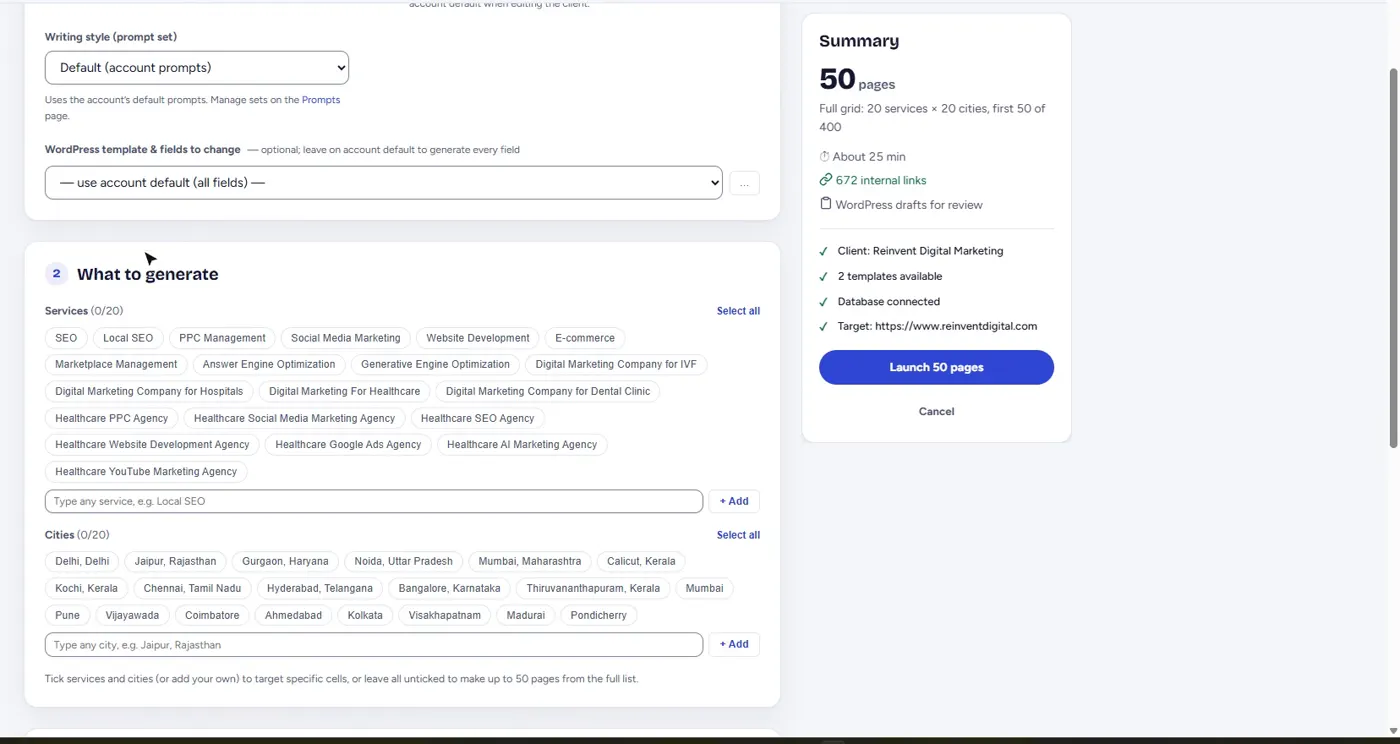
Scaleo SEO is built around steps 2 to 6. It researches each city, writes every service and city page on its own, has a second AI model score each page and rewrite the ones that fail, and publishes to WordPress through a connector plugin that sets Yoast or Rank Math fields and fills Elementor or ACF layouts. Indexing and clicks are then tracked per page. Here is how the WordPress integration works.
What should every automatically created location page include?
Whichever method you use, a location page should answer the questions a visitor from that city has. Treat this as the minimum for every page:
- How you serve that place: a branch address, a service area, or how visits and delivery work there.
- Something specific to it: localities covered, local prices or travel times, local rules, or the problems customers there raise most.
- Real proof: reviews, photos or case notes from that area, and only ones that exist.
- A unique title and meta description naming the service and the city.
- LocalBusiness schema, or a subtype such as MedicalBusiness, with the correct address and contact details.
- Internal links to the service page, nearby areas and a locations hub.
- Images with descriptive alt text, never one stock photo captioned with each new city.
The quick test: swap the city name on one page for another city. If the page still reads as true, it is not a location page yet. Our guide to doorway pages vs location pages shows where Google draws the line.
Can bulk location pages get your site penalised by Google?
Yes, when they exist only to rank. Google's spam policies list doorway abuse, including "having multiple domain names or pages targeted at specific regions or cities that funnel users to one page", and scaled content abuse, including "using generative AI tools or other similar tools to generate many pages without adding value for users". The scaled content policy applies however the pages are made, whether by template, import or AI. Pages that give visitors real local information are not what either policy describes.
How many location pages should you create at once?
Fewer than your matrix allows. Start with the services and cities where the business already has customers, publish them in batches, and add more once Search Console shows the first batch indexed and earning impressions. Our framework for how many location pages to build sets out the three tests to apply first.
Why are automatically created location pages not indexed?
Usually because Google cannot find them, or finds nothing in them worth indexing. In our location page indexing study, 997 of 1,054 programmatic pages Scaleo SEO published for 9 sites in India (94.6%) were indexed. The one site that lagged, at 46%, had pages missing from the sitemap Google read and no internal links pointing to them.
- List every new page in your XML sitemap. Google's sitemap documentation allows up to 50,000 URLs or 50 MB uncompressed per sitemap, and uses lastmod only when it is consistently accurate.
- Link each page from at least one crawlable page, such as a locations hub or the service page.
- Give each page enough local substance to be worth indexing. Thin, near-identical pages are the ones that sit in "Crawled, currently not indexed".
If pages are already stuck, our guide to fixing location pages that are not indexed walks through each Search Console status.
Which method should you choose?
Choose by where each page's unique content will come from. If you have rich data for every city, a template plugin is the cheapest way to present it. If the content already lives in a spreadsheet or database, a CSV import with custom fields keeps it maintainable. If you need many pages and nobody has time to write them, use an AI generator, but only one that checks every page before it publishes. For named tools in each group, see our comparison of the best programmatic SEO tools.
Questions about creating location pages in WordPress
Is creating many city pages bad for SEO?
Not by itself. Many city pages are fine when each one gives visitors real information about that place and the business genuinely serves it. They become a problem when they are near copies made only to rank, which Google's spam policies treat as doorway pages.
Can I use AI to write location pages?
Yes, as long as each page adds value for visitors. Google's guidance supports using AI for research and structure, and asks that AI-generated content is fact-checked and reviewed. Give the model real business facts and local research, and check every page before it goes live.
Is there a free plugin to bulk create pages in WordPress?
Yes. Several page generator plugins have free versions on wordpress.org, including LPagery, which creates pages from one template and a spreadsheet. Paid plans usually add features such as Google Sheet sync or AI writing.
How do I stop location pages being duplicates of each other?
Give each page information that is only true of that place: localities served, local prices, branch details, local photos and local FAQs. Spintax and synonym swaps change the wording but not the information, so they do not fix duplication.
Should location pages be static pages or generated on the fly?
Use real pages with their own URLs that crawlers can reach. Pages assembled on the fly from a visitor's location are hard for Google to crawl and index. Every method in this guide creates normal WordPress pages.
Want researched city pages without building the pipeline?
Create a free account in a minute, or tell us your services and cities and we'll set up your first campaign, published into your own WordPress site.